
Overview
The ScrapRight API allows you to connect third-party applications and reporting tools directly to your ScrapRight data. Access is authenticated using an API key you generate from within ScrapRight, which you exchange for a short-lived JWT token used on all API requests.
The API currently provides access to the following resources:
- Customers - list, retrieve, and search active customer records
- Businesses - list, retrieve, and search active business records
- Purchases - retrieve purchase history by customer/business ID or by date range
For the full endpoint reference, see the interactive API docs at [your ScrapRight URL]/api/v1/swagger.
Generating an API Key
Once API access is enabled, an administrator can generate a key from within ScrapRight.
- Navigate to Admin > Configuration > Synchronization > API Keys
- Click Generate API Key.
- Copy the key and store it in a secure location. The full key value is only shown once.
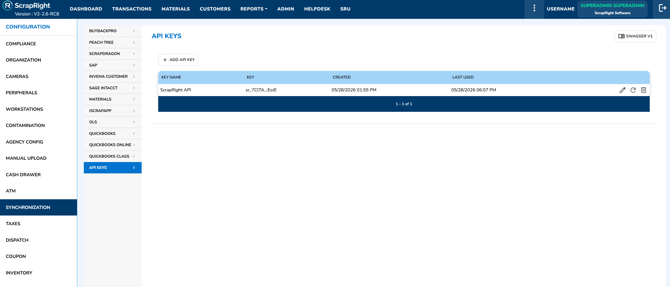
Admin > Configuration > Synchronization > API Keys
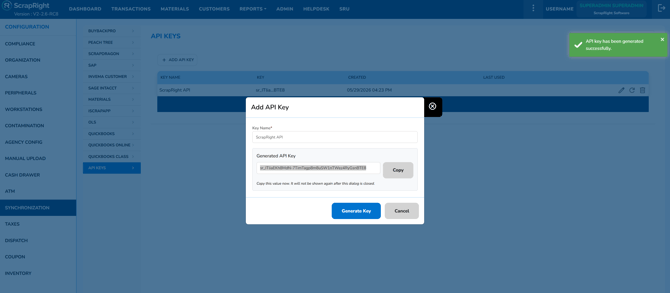
Click Generate API Key to create your key
Important: ScrapRight allows only one active API key per account. Generating a new key immediately revokes the existing one. Any integrations using the old key must be updated with the new key before they will work again.
Authentication
The ScrapRight API uses a two-step authentication process: exchange your API key for a JWT access token, then pass that token as a header on every API request.
Step 1: Exchange Your API Key for a Token
Send a POST request to the token endpoint with your API key in the X-Api-Key header:
POST /api/v1/authorization/token Host: [your ScrapRight URL] X-Api-Key: your-api-key-hereA successful response returns an access token and a refresh token:
{ "IsError": 0, "Message": "Token generated successfully.", "Data": { "access_token": "eyJ...", "refresh_token": "eyJ...", "token_type": "Bearer", "expires_in": 3600, "refresh_token_expires_in": 2592000, "requestLimitPerMinute": 10 } }| Field | Value | Description |
|---|---|---|
access_token |
string | JWT to include with every API request. Valid for 1 hour. |
refresh_token |
string | Used to get a new access token when it expires. Valid for 30 days. |
expires_in |
3600 | Access token lifetime in seconds (1 hour). |
refresh_token_expires_in |
2592000 | Refresh token lifetime in seconds (30 days). |
requestLimitPerMinute |
integer | Your account's API rate limit per minute. |
Step 2: Call the API Using Your Token
Pass the access_token value in the X-Access-Token header on each request. Do not include a Bearer prefix.
GET /api/v1/customer?page=1&pageSize=25 Host: [your ScrapRight URL] X-Access-Token: eyJ...Note: ScrapRight uses
X-Access-Token, not the standardAuthorization: Bearerheader. Using the wrong header will return a 401 Unauthorized error.
Step 3: Refresh an Expired Token
Access tokens expire after 1 hour. Use the refresh_token to get a new access token without re-sending your API key:
POST /api/v1/authorization/refresh-token Host: [your ScrapRight URL] Content-Type: application/x-www-form-urlencoded refreshToken=your-refresh-token-hereThe refresh token rotates on every successful use - store the new refresh token returned in the response. If the refresh token expires (after 30 days), request a new token pair using your API key.
Reminder: If you regenerate your API key in ScrapRight, all tokens issued from the old key stop working immediately. Request a new token pair with the new key.
Rate Limits
Your rate limit is returned in the token response as requestLimitPerMinute. Exceeding this returns a 429 Too Many Requests response. All paginated endpoints cap at 100 records per page.
Tip: For large data syncs, use pagination (
pageandpageSizequery parameters) rather than requesting all records in a single call to stay within rate limit thresholds.
API Key Security
Your API key provides full access to your ScrapRight data. Treat it with the same care as a password:
- Do not share your API key with unauthorized users or embed it in client-side code.
- Do not commit your API key to source control (e.g. GitHub, Azure DevOps).
- Store the key in a secure secrets manager or environment variable within your integration.
- If you suspect your key has been exposed, regenerate it immediately from Admin > Configuration > Synchronization > API Keys. This will invalidate your existing key.